Waving
I'm waving but nothing shows up.
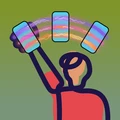
Wave from the shoulder with a straight arm. Raise the phone into position in one quick, smooth motion, then wave slowly.
People say the letters are jumbled.
The usual cause is waving too fast. Take at least a second per side; 2–3 seconds per pass looks great.
The message is cut off or hard to read.
Keep it under about 30 characters. Longer messages need more than a half-circle sweep to fit. Stand back, too: about 5–6 meters (20 feet) is ideal.
The first wave looked off.
That's normal. Design Wave uses the first wave to learn your form.
My message says "Design Wave".
The message field is empty, so Design Wave shows its name instead. Type a message to replace it.
Which way should I wave?
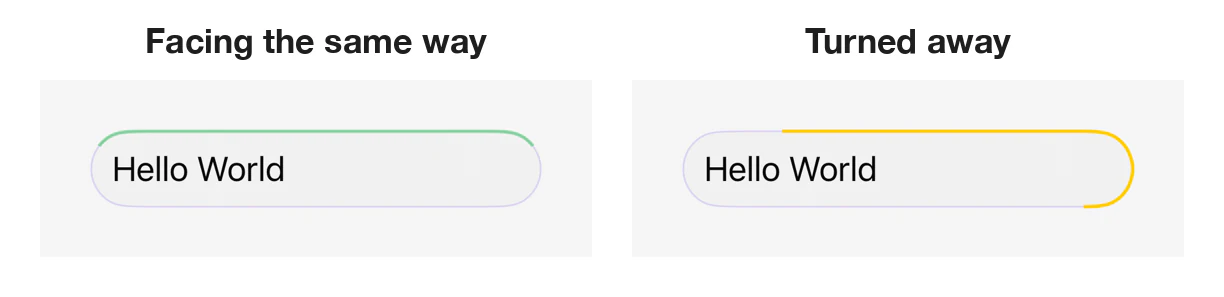
In the direction your phone is pointing. Before you wave, hold the phone in front of you with its top pointing at your audience. The thin colored line on the border of your message field works like a spirit level: once you've held the phone pointing one way for a few seconds, it turns green, and that's the direction to wave in. Yellow means you've turned since, so hold still until it's green again. Then raise the phone overhead in one quick, smooth motion, with the screen still facing that way.

Can I turn to face a different direction?
Not while you're waving: keep the phone facing the same way the whole time. To wave toward a different audience, stop, let the app return to the Gallery, then point the phone at the new audience and wait for the line to turn green.
The message stutters.
Your design may have several expensive layers. See Keeping it smooth in the User Guide.
Any tips for holding the phone?
Grip it firmly. A phone grip or strap helps.
Still not getting it right?
Run the Interactive Tutorial again from Help in Settings. It grades your wave and gives you personalized tips. The Waving Tips page goes deeper on technique.
How it works
Is it persistence of vision?
No. That's the most common guess, and the real answer is more interesting. Your phone becomes a window: as you sweep it overhead, Design Wave tracks exactly where the phone is and shows only the slice of your message that belongs at that spot. Anyone watching sees a still banner hanging in the air, revealed one slice at a time through a moving window. Psychologists call this anorthoscopic perception, or slit viewing, and first described it in the 1830s.
A light-up wand has to flash its whole image dozens of times a second. Your audience's brain assembles a Design Wave message over a full one-to-two-second sweep.
Devices
Can I use Design Wave on iPad?
On iPad you can browse and preview designs, but waving needs an iPhone.
Which version of iOS do I need?
iOS 18 or later.
Privacy and safety
Does Design Wave collect my data?
No. There are no accounts, no analytics and no tracking. The app never asks for your location or contacts, and making and waving designs works fully offline.
Is my message saved?
Only your current design is kept, on your phone, so it's there next time you open the app. Design Wave keeps no history. Clearing the message field replaces the saved message, but, as with most apps, deleted text can linger in the phone's storage for a while. See Protests and sensitive events for how to remove it from your phone.
Can I use Design Wave at a protest?
Yes. Read Protests and sensitive events first. Remember that a message you wave is public: cameras and bystanders can link it to you. Airplane mode alone doesn't stop your phone recording your location.
Contact
For anything else, use Contact Us in Settings, or email our support team. Privacy questions can go to privacy@reiterate-app.com.